Microsoft Store không tải ứng dụng, game hoặc cập nhật (bị kẹt ở 0%, lỗi tải, hoặc không phản hồi) là lỗi rất phổ biến. Dưới đây là cách khắc phục theo thứ tự hiệu quả nhất.
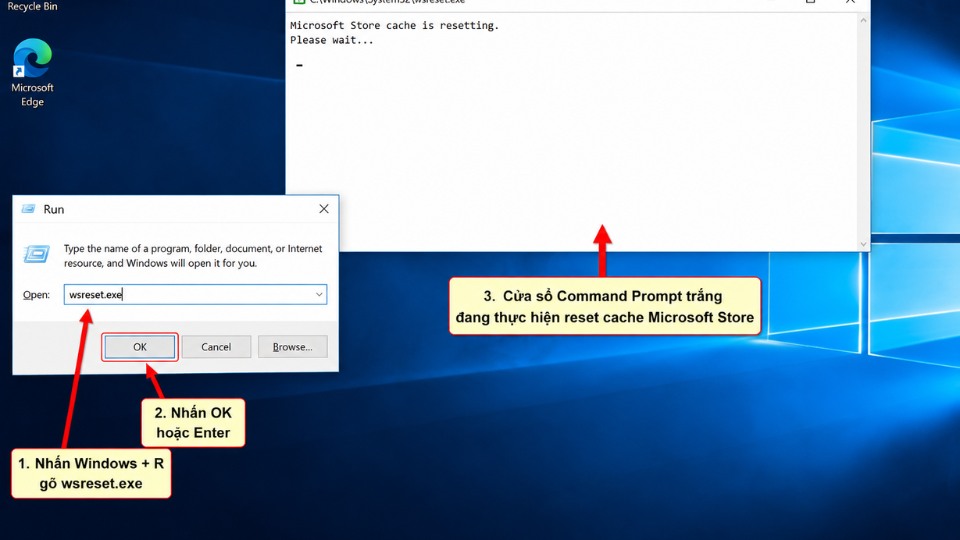
1. Cách nhanh nhất: Reset Microsoft Store Cache
- Nhấn Windows + R để mở hộp thoại Run.
- Gõ wsreset.exe rồi nhấn Enter.
- Một cửa sổ Command Prompt trắng sẽ hiện ra khoảng 10-30 giây rồi tự đóng.
- Mở Microsoft Store và thử tải lại.
2. Chạy Microsoft Store Troubleshooter
- Nhấn Windows + I mở Settings.
- Chọn Update & Security → Troubleshoot → Additional troubleshooters.
- Tìm Windows Store apps → nhấn Run the troubleshooter.
- Để Windows tự động sửa lỗi.
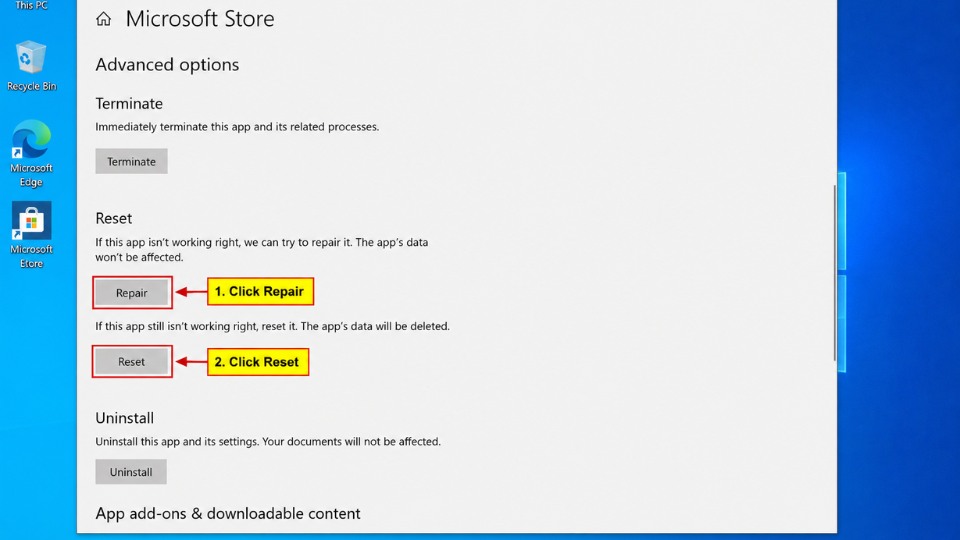
3. Reset hoặc Repair Microsoft Store
- Nhấn Windows + I → Apps → Apps & features.
- Tìm Microsoft Store → click vào → Advanced options.
- Nhấn Repair trước. Nếu không được thì nhấn Reset.
4. Re-register Microsoft Store qua PowerShell
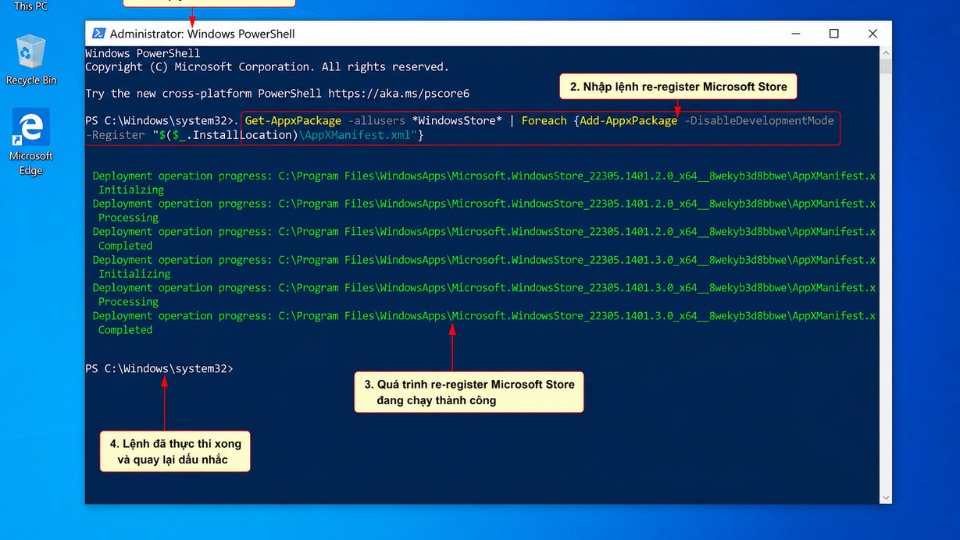
- Nhấn Windows + S, gõ PowerShell, chuột phải → Run as administrator.
- Dán lệnh sau rồi Enter:
PowerShell
Get-AppXPackage *WindowsStore* -AllUsers | Foreach {Add-AppxPackage -DisableDevelopmentMode -Register "$($_.InstallLocation)\AppXManifest.xml"}- Khởi động lại máy tính.
5. Các cách khắc phục nâng cao
- Kiểm tra kết nối internet và tắt VPN/Antivirus tạm thời.
- Chạy SFC và DISM:
- Mở Command Prompt (Admin) → gõ:
cmd
DISM /Online /Cleanup-Image /RestoreHealth
sfc /scannow
- Mở Command Prompt (Admin) → gõ:
- Đăng xuất rồi đăng nhập lại tài khoản Microsoft trong Store.
- Cập nhật Windows 10 mới nhất.